


课程
1146 字
约 4 分钟
大三下
4.1 Cohen-Sutherland 编码裁剪算法
计算机图形学labs/lab04-line-clipping·更新于 2026-09-15
4.1 Cohen-Sutherland 编码裁剪算法
1. 任务描述
根据下面要求,在右侧修改代码空间,绘制出预期输出的图片。平台会对你编写的代码进行测试。
本关任务
- 理解直线裁剪的原理(Cohen-Sutherland 算法、中点分割算法、梁友栋算法)。
- 利用 VC + OpenGL 实现直线的编码裁剪算法,在屏幕上用一个封闭矩形裁剪任意一条直线。
- 调试、编译、修改程序。
运行前
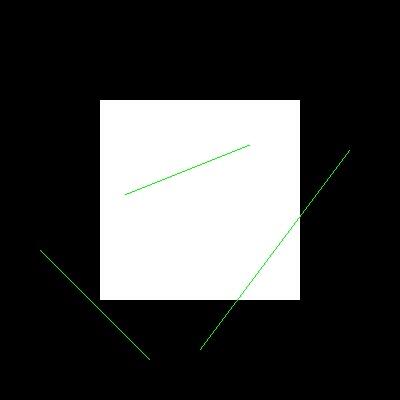
输出
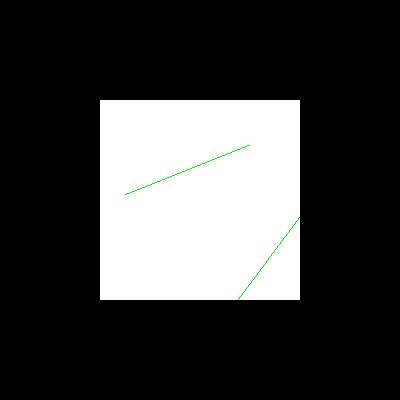
具体要求
- 对
CompCode(Point node, MyRect rect)函数进行补全。 - 对
LineClipCohenSurtherland(MyRect rect, Point& node1, Point& node2)函数进行补全,最终实现裁剪后的图片。
相关知识
为了完成本关任务,你需要掌握:Cohen-Sutherland 直线裁剪算法。
1. Cohen-Sutherland 算法原理
Cohen-Sutherland 算法是一个经典的编码算法。该算法的主要思想是,对于每条线段,分为 3 种情况处理:
- 若线段完全在窗口之内,则显示该线段,称为“取”。
- 若线段明显在窗口之外,则丢弃该线段,称为“弃”。
- 若线段既不满足“取”条件,也不满足“弃”的条件,则把线段分割为两段。其中一段完全在窗口之外,可弃之;对另一段则重复上述处理。
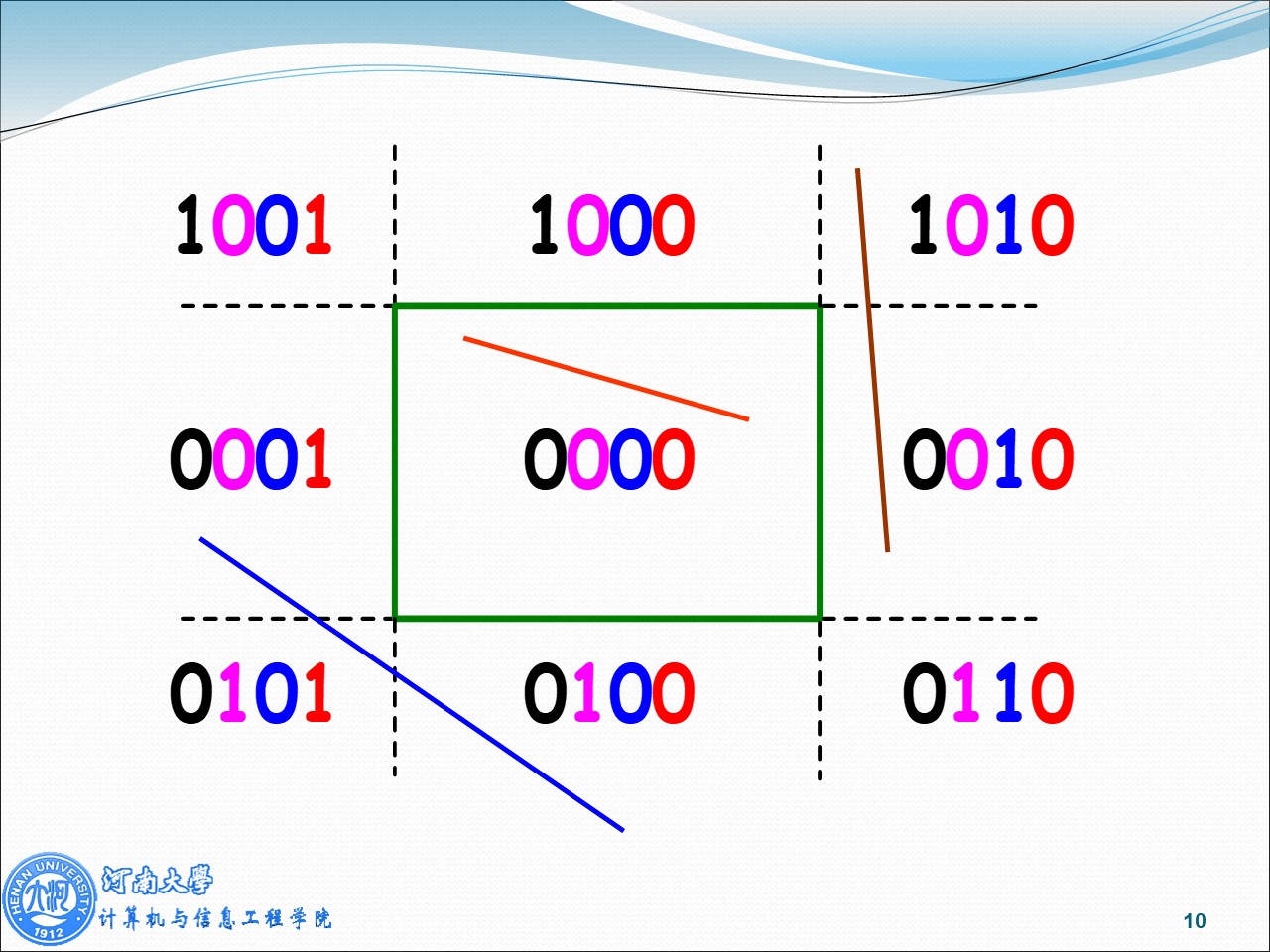
在编码裁剪算法中,为了快速判断一条直线段与矩形窗口的位置关系,采用了如下图所示的空间划分和编码方案。
裁剪一条线段时,先求出两端点所在的区号 code1 和 code2。若 code1 = 0 且 code2 = 0,则说明线段的两个端点均在窗口内,那么整条线段必在窗口内,应取之;若 code1 和 code2 经按位“与”运算的结果不为 0,则说明两个端点同在窗口的上方、下方、左方或右方。这种情况下,对线段的处理是弃之。如果上述两种条件都不成立,则按第三种情况处理:求出线段与窗口某边的交点,在交点处把线段一分为二,其中必有一段完全在窗口外,可弃之,对另一段则重复上述处理。
开始你的任务吧,祝你成功!
2. 我的回答
文件 step1/test1.cpp:
// 评测代码所用头文件-开始
#include <opencv2/core/core.hpp>
#include <opencv2/highgui/highgui.hpp>
#include <opencv2/imgproc/imgproc.hpp>
// 评测代码所用头文件-结束

// 提示:写完代码请保存之后再进行评测
#include <GL/freeglut.h>
#include <stdio.h>

#define LEFT   1
#define RIGHT  2
#define BOTTOM 4
#define TOP    8

struct MyRect
{
	int xmin, xmax, ymin, ymax;
    MyRect() : xmin(), xmax(), ymin(), ymax(){};
    MyRect(int a, int b, int c, int d) : xmin(a), xmax(b), ymin(c), ymax(d){};
};

struct Point
{
	int x, y;
	Point() : x(), y() {};
	Point(int a, int b) :x(a), y(b) {};
};

MyRect  rect;
Point vPoint[6];

void LineGL(Point node1, Point node2)
{
	glBegin(GL_LINES);
	glColor3f(0.0f, 1.0f, 0.0f);
    glVertex2f(node1.x, node1.y);
	glVertex2f(node2.x, node2.y);
	glEnd();
}

int CompCode(Point node, MyRect rect)
{
    // 请在此添加你的代码
    /********** Begin ********/
    int code = 0;
    if (node.x < rect.xmin)      code |= LEFT;
    else if (node.x > rect.xmax) code |= RIGHT;
    if (node.y < rect.ymin)      code |= BOTTOM;
    else if (node.y > rect.ymax) code |= TOP;
    return code;
    /********** End **********/
}

void LineClipCohenSurtherland(MyRect rect, Point& node1, Point& node2)
{
    bool accept = false; // 注意这里改成 false
    // 请在此添加你的代码
    /********** Begin ********/
    int code1 = CompCode(node1, rect);
    int code2 = CompCode(node2, rect);

    while (true)
    {
        if ((code1 | code2) == 0) // 两端点编码均为0,完全在窗口内
        {
            accept = true;
            break;
        }
        else if (code1 & code2) // 两端点在某一侧均被排除,完全在窗口外
        {
            break;
        }
        else // 需要裁剪
        {
            int code = (code1 != 0) ? code1 : code2;
            Point node;

            if (code & LEFT) // 与左边界相交
            {
                node.x = rect.xmin;
                node.y = node1.y + (node2.y - node1.y) * (rect.xmin - node1.x) / (node2.x - node1.x);
            }
            else if (code & RIGHT) // 与右边界相交
            {
                node.x = rect.xmax;
                node.y = node1.y + (node2.y - node1.y) * (rect.xmax - node1.x) / (node2.x - node1.x);
            }
            else if (code & BOTTOM) // 与下边界相交
            {
                node.y = rect.ymin;
                node.x = node1.x + (node2.x - node1.x) * (rect.ymin - node1.y) / (node2.y - node1.y);
            }
            else if (code & TOP) // 与上边界相交
            {
                node.y = rect.ymax;
                node.x = node1.x + (node2.x - node1.x) * (rect.ymax - node1.y) / (node2.y - node1.y);
            }

            if (code == code1)
            {
                node1 = node;
                code1 = CompCode(node1, rect);
            }
            else
            {
                node2 = node;
                code2 = CompCode(node2, rect);
            }
        }
    }
    /********** End **********/
    if (accept)
        LineGL(node1, node2);
}

void MyDisplay()
{
	glClear(GL_COLOR_BUFFER_BIT);
	glColor3f(1.0f, 1.0f, 1.0f);
	glRectf(rect.xmin, rect.ymin, rect.xmax, rect.ymax);

  	for (int i = 0; i < 5; i+=2)
		LineClipCohenSurtherland(rect, vPoint[i], vPoint[i+1]);

	glFlush();
}

void Init()
{
	glClearColor(0.0, 0.0, 0.0, 0.0);
	glShadeModel(GL_FLAT);

    rect = MyRect(100, 300, 100, 300);

	vPoint[0] = Point(200, 50); vPoint[1] = Point(350, 250);
	vPoint[2] = Point(125, 205); vPoint[3] = Point(250, 255);
	vPoint[4] = Point(40, 150); vPoint[5] = Point(150, 40);
}

void MyReshape(int w, int h)
{
	glViewport(0, 0, (GLsizei)w, (GLsizei)h);
	glMatrixMode(GL_PROJECTION);
	glLoadIdentity();
	gluOrtho2D(0.0, (GLdouble)w, 0.0, (GLdouble)h);
}

int main(int argc, char* argv[])
{
	glutInit(&argc, argv);
	glutInitDisplayMode(GLUT_RGB | GLUT_SINGLE);
	glutInitWindowPosition(100, 100);
	glutInitWindowSize(400, 400);
	glutCreateWindow("Hello World!");

	Init();
	glutDisplayFunc(MyDisplay);
    glutReshapeFunc(MyReshape);
    glutMainLoopEvent();

    /*************以下为评测代码,与本次实验内容无关,请勿修改**************/
	GLubyte* pPixelData = (GLubyte*)malloc(400 * 400 * 3);//分配内存
    GLint viewport[4] = {0};
    glReadBuffer(GL_FRONT);
    glPixelStorei(GL_UNPACK_ALIGNMENT, 4);
    glGetIntegerv(GL_VIEWPORT, viewport);
    glReadPixels(viewport[0], viewport[1], viewport[2], viewport[3], GL_RGB, GL_UNSIGNED_BYTE, pPixelData);

	cv::Mat img;
    std::vector<cv::Mat> imgPlanes;
    img.create(400, 400, CV_8UC3);
    cv::split(img, imgPlanes);

    for(int i = 0; i < 400; i ++) {
        unsigned char* plane0Ptr = imgPlanes[0].ptr<unsigned char>(i);
        unsigned char* plane1Ptr = imgPlanes[1].ptr<unsigned char>(i);
        unsigned char* plane2Ptr = imgPlanes[2].ptr<unsigned char>(i);
        for(int j = 0; j < 400; j ++) {
            int k = 3 * (i * 400 + j);
            plane2Ptr[j] = pPixelData[k];
            plane1Ptr[j] = pPixelData[k+1];
            plane0Ptr[j] = pPixelData[k+2];
        }
    }
    cv::merge(imgPlanes, img);
    cv::flip(img, img ,0);
    cv::namedWindow("openglGrab");
    cv::imshow("openglGrab", img);
    cv::imwrite("../img_step1/test.jpg", img);
	return 0;
}这只是一个公告
站点域名henu.hodaru.com
Fireflyv6.16.7
Astrov7.2.10
Nodev22.23.2
pnpmv11.22.0
构建时间2026年9月15日 14:41:24
系统信息Linux / x86_64